1-800-710-1900
software solutions for landscape professionals
  • Overview
  • Video
  • Features & Benefits
  • Sample Drawings
  • Reviews
  • Case Studies
  • Requirements
Draw spectacular, information-rich landscape designs.

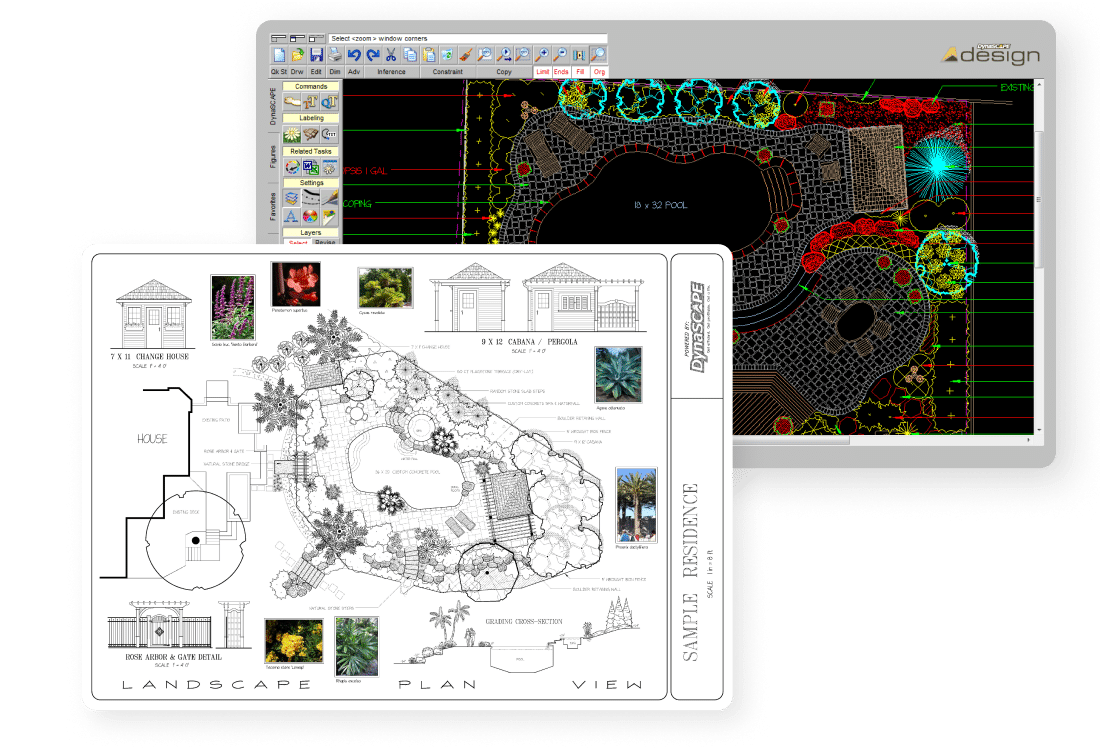
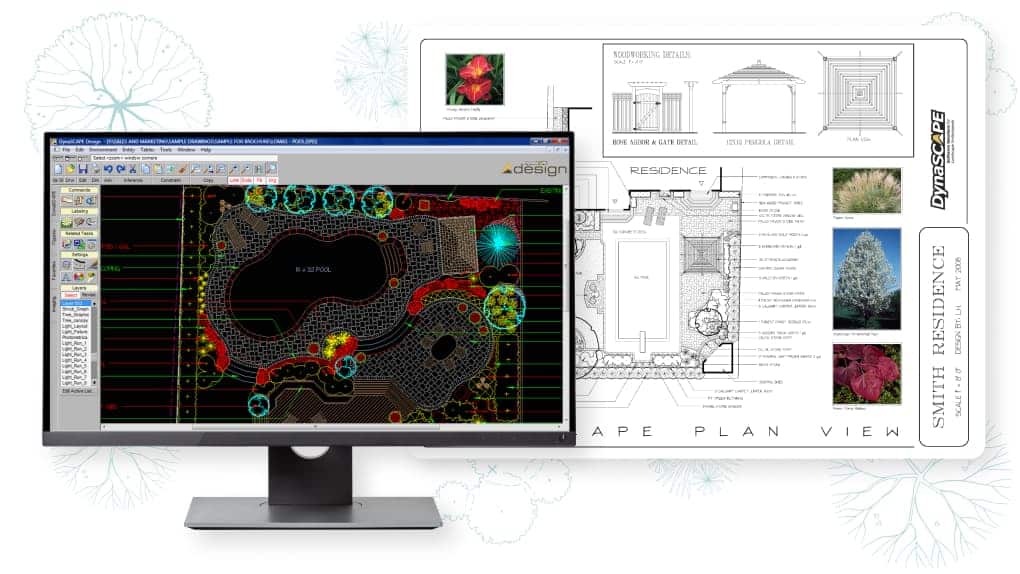
You only need to see a single page of output from DynaSCAPE Design to appreciate just how completely computer-assisted landscape design software has come of age. The quality of DynaSCAPE Design drawings leaps off the page with their fine line weights, precise shapes, and an artistic flare that makes it hard to believe that they weren't hand-drawn. Combine those qualities with:


  • Subtle coloring from the DynaSCAPE Color module,
  • Loads of professional graphic symbols and patterns
  • Color photographs from our Horticopia-powered Online Plant Database and,
  • Instant material lists and plant picture catalogues
The result is a spectacular, information-rich landscape design that will amaze your clients, win you new contracts and assist your crew as they bring your plan to life. In the field of CAD landscape design software, DynaSCAPE Design continues to lead the way with a level of design quality that remains unequalled in the industry. And its seamless integration with the rest of the DynaSCAPE Suite makes it easy for you to transform your drawings into both instant and accurate quotations, and windows of insight into the health and growth of your entire landscape business.
View a DS|Design Presentation
Click here to watch the Overview Video
Features and benefits of DS|Design

DynaSCAPE Design is professional landscape design software that helps you produce attractive, feature-rich drawings quickly and easily.  Here are some of the program’s main features and benefits:

Click to view enlargement Create designs in a hand-drawn style that look simply amazing
  • Produce painstaking detail in a fraction of the time
  • Communicate great design ideas with great-looking designs
  • Elicit great design ideas from every estimator on your team, regardless of drawing abilities
  • Produce consistently professional-looking output that will help you win contracts
  • Impress your clients with its easy to read, crisp, clean line weights
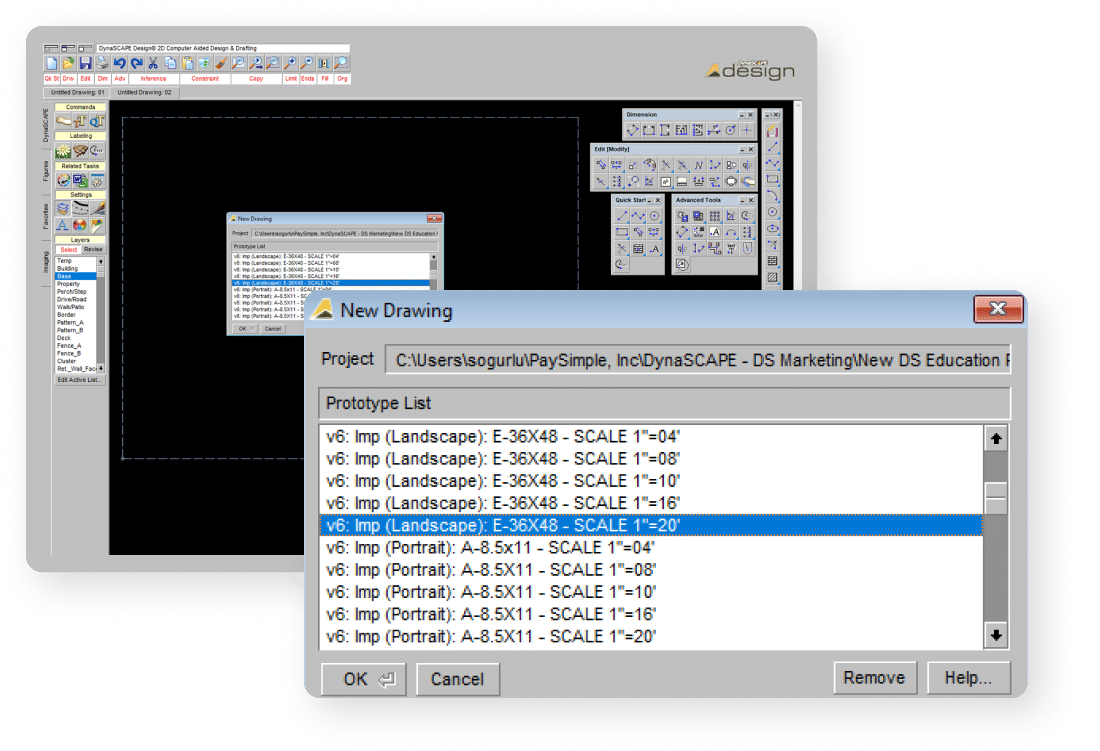
Click to view enlargement Set up new drawings quickly and easily
  • Just select your template, sheet size and scale
  • Layers come pre-set so no additional set-up is required
  • Line colors, weights and styles are pre-set for optimum visibility
  • Even text and leader styles are predetermined to suit your drawing scale
  • These are all editable if you need to make changes at any point in the drawing process
  • Import images like property surveys to get you designing faster
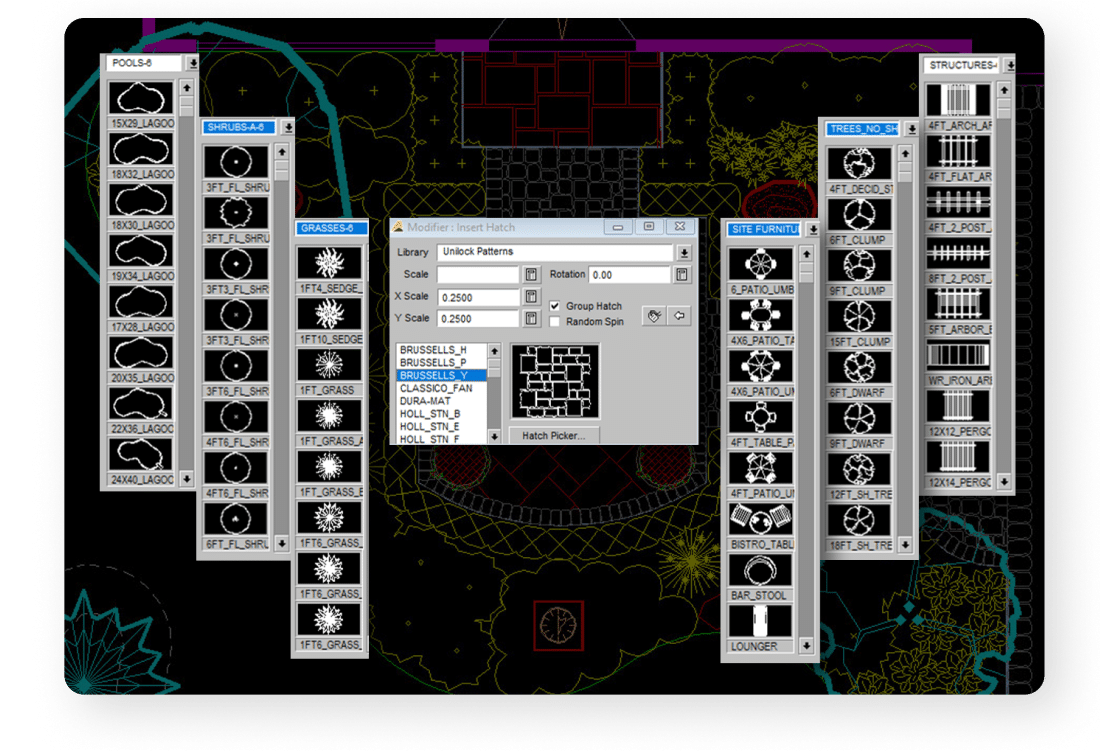
Click to view enlargement Insert pre-drawn shapes from extensive symbol libraries
  •  Over 1200 pre-drawn library figures, for all areas of landscape design: planting, natural stone, paving stone, flagstone, mulch; swimming pools, ponds and water features; outdoor lighting, irrigation and woodworking
  • Professional botanical symbols include trees, shrubs, evergreens, hedges, perennials & ornamental grasses
  • All symbols are drawn to scale and identified by size and type
  • All symbols are organized by type and sub-type, making it easy to find the ones you want
  • Drag and drop ease makes symbol insertion easier and faster
  • Add your own custom symbols and libraries
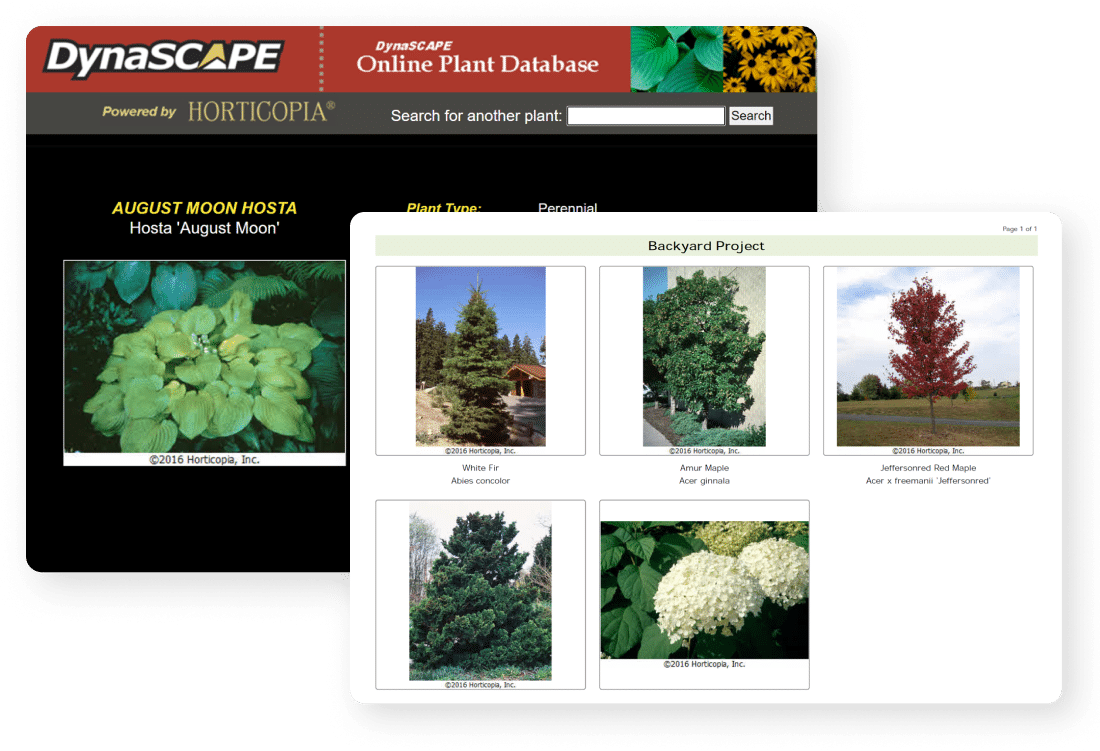
Find and add plants from a Horticopia Powered Online Plant Database
  • Choose from over 9,000 plants
  • Select plants by name and view full color images and cultural information
  • Search for plants by characteristic, bloom or color
  • Build your own detailed plant material database for labeling
Click to view enlargement Add plant photos to your drawings
  •  Insert color photographs of all selected plants into your landscape drawings with the Add Image tools
  • One tool lets you search for an image by name, another matches images to your plant label
  • Both these tools access the Online Plant Database for images
  • Helps you to show the intent of the design and material choices
  • No need to haul books and catalogues to show clients the plants you've selected
Click to view enlargement Label every component in your drawings
  • Plants are quickly auto-counted and labeled
  • Key labels allow plant schedules and material lists to be generated automatically
  • Fast labeling routines apply intelligent labels to every piece of the design
  • Customize your own softscape list or search the Online Plant Database for labels
Click to view enlargement Build unique Plant Plant Picture Catalogues for your clients
  • Create full color plant picture catalogues in minutes
  • Plants from your material list are matched up with images and cultural information
  • Plant picture catalogues are produced as Adobe PDF documents for easy printing
  • Option to use your own images
Click to view enlargement Add product details from leading landscape product companies
  • Unilock patterns and stone catalogue price lists
  • Nightscaping symbols, illumination patterns, fixture catalogue and voltage drop calculator
  • AquaScape Designs pond designs, stream segments, components and product catalogue
Click to view enlargement Calculate areas & quantities and add dimensions
  • Clusters figures, groups them into massings and auto-counts them for label quantities
  • Instantly calculates areas that would be time-consuming to calculate by hand
  • Handles unusual shapes with ease
  • Includes easy, quick tools for placing linear and radius dimensions on the drawing
Create layout/staking plans
  • Quickly create and print a dimension plan for on-site layout without having to redraw
  • Improve communication of your landscape design ideas with the crews on site
  • No more time wasted measuring plans by hand
  Output your landscape designs to multiple formats
  • Print a drawing to any printer type, or send it to a print shop as a plot file *Plot option remains in the software but is not supported
  • Save drawings as JPEG or PDF files
  • Export to AutoCAD as DWG & DXF files
  • Send drawings in PDF or JPEG format via e-mail to clients or printers that don't have DynaSCAPE landscape design software to open them
  Save time
  • Repetitive tasks are made easy
  • Drawing revisions require much less effort
  • Store and reuse concepts and details
  • Make multiple drawing views without having to redraw each time
  • Use of layers allows multiple print-outs without having to redraw
  • Copy scanned lot plans without having to redraw them
  Enjoy all the features of an advanced CAD drawing tool
  • CAD functionality ensures drawing accuracy and speed
  • Drawing tools are specifically tailored for landscape designers
  • Multiple drawing layers can be revealed or hidden as required
  • Makes smooth curved lines
  • Scalable: no limits to the size or scale of the project
  • Can import existing AutoCAD files in DWG & DXF format, such as existing site and floor plans
  Get up to speed quickly with our extensive training resources
  • Learn step-by-step with the many self-paced video tutorials included with the program
  • Follow realistic exercises to understand quickly how the software works
  • Easier to use than Photoshop or Illustrator
  • Printed training materials include a User Guide, Reference cards, Quick Start guides and Tutorial manuals
  • Access the online DynaSCAPE User forums to look up answers to your questions
  • Book special training classes for additional help with the initial learning curve
  Enhance the professionalism of your landscape drawings and your business
  • Line thicknesses are pre-set by layer to industry-standard conventions
  • Proper line hierarchy ensures that all of your output is consistently professional
  • Aligned with green industry leaders
  • Used and recognized by prominent landscape design schools
View some DS|Design Drawings!
Customer reviews of our CAD landscape design software
Read what some of our 3,000+ customers are saying, and why they consider DynaSCAPE Design to be the leading professional landscape design software on the market:

"DynaSCAPE has helped meet the demands and time pressure that comes with our seasonal business as well as keeping more and more work in house and avoiding outsourcing.  With the click of a mouse I can create separate plans for hardscape, softscape, lighting, grading, etc.  Making minor changes, large scale revisions, or as built plans are quick and easy.”
Landscape Architect Stephen Marzahl - LDA President
Creative Environment Group, Ltd.
Chicago, Illinois
"I wanted to start off by saying how extremely happy we are with our DynaSCAPE software. It has expedited our design process and the crisp clean look of the design has helped us sell work. Along with the ease of making revisions and sending electronically, it has definitely cut down on the time it takes me to turn over a design.  Using a CAD system like DynaSCAPE shows that you are a professional, especially if your competitors don’t use one.  With more symbol detail and a proper breakdown of line weights, clients get a better feel for our design concepts.”
Regional Designer/Estimator Fred Barberra
Valleycrest
Norristown, Pennsylvania
“I just purchased DynaSCAPE and I wanted to let you know I am very pleased.  After spending only a few hours in Design and then adding color, I presented my first design and sold it.  The software paid for itself on the first job.”
James Snyder
Albert Group Landscaping, Inc.
Washingtonville, New York
“It has taken my business to a higher level and allowed me to remain a one-person shop for now. In addition to streamlining my processes, using DynaScape has allowed me to work more efficiently and produce more designs (and revisions) than before. It's been quite amazing."
Ellen Moderhack
MODE Landscape Design
Chicago, Illinois
“DynaSCAPE is above and beyond its competitors. The plan view designs look so professional and when the rendering program is released, I think you'll have people who have scoffed at designing on the computer turning their heads. It looks amazing!! I can't wait!!
Carolyn Robinson
Auburn University
Alabama
" I am extremely excited about the future of my business. With software like DynaSCAPE, it will help to put our work on yet another level of professionalism. The software will help with the speed necessary to get designs/quotes/dialogue, back in a customers hand. This will only help with time management, and overall will enable our firm to accomplish more work within our short build season. Thank you.”
Jason Partridge
Natural Elements Landscape Design & Construction Inc.
Cheltenham, Ontario
Success Stories from Landscape Professionals
The following case studies explain how some of our customers are using and benefiting from their use of DynaSCAPE’s landscape design software:

"DynaSCAPE reduced the time to generate an estimate or proposal by 60 per cent or more, allowing us to take on more work, respond to clients quicker and be more accurate in our numbers. Improved efficiency lead to better productivity and profitability that continues to this day”
Click here to read the case study
Design/Sales Manager Dan Maffei.
W.D. Wells and Associates, West Grove, Pennsylvania

"I looked at other landscape design software as well, but I kept thinking, 'it's not DynaSCAPE'.  I also tried using AutoCAD, but it's not geared for the green industry the way DynaSCAPE is.”
Click here to read case study
Designer Michael Strubeck
Ecoscape, Huntersville, North Carolina

"Our decision to adopt DynaSCAPE originated from a desire to avoid the time consuming reworking of plans.”
Click here to read the case study
Owner/Designer Andrew Sykes
Garrett Churchill, Abington , Pennsylvania
System Requirements
  • Windows XP ® (Service Pack 2), Windows Vista® (32 bit and 64 bit operating systems), Windows 7®
  • Pentium IV® or higher
  • Minimum 512MB RAM (1.0GB strongly recommended)
  • Minimum screen resolution of 1024 x 768 pixels
  • Microsoft Internet Explorer® 6 or later
  • Internet connection (updates and access to the online plant database)

Microsoft Office Suite 2000® (or later) software is required for exporting materials to Excel® and Word®. Adobe Reader ® software is required for exporting plant picture catalogues.

Windows 7 Notice: If you use folder redirection for your My Documents folder, do not install or upgrade to Windows 7 until further notice.

DS|Quote and DS|Manage 4.5 will also be tested and if any major issues are found they will need to be addressed in an update (date to be determined).

Student Version Notice: Upgrading Vista to Windows 7 will cause the Student Version to lock-up. The next Student Version that will be Windows 7 compatible will be released for September 2010.


Recommended Printers for Design & Color

Canon imagePROGRAF iPF600