
Which Landscape Design Software Fits Your Business?
Not sure which DynaScape setup fits? Answer four quick questions.
Find your fitAbout this software comparison: Written by the DynaScape team using Pro Landscape+’s public product and pricing information, check November 2026. We’ve noted where each product is the better fit. How we compared
The landscape design software you choose affects more than how you create plans. It also plays a role in how you present designs to clients, calculate materials, and prepare projects for installation.
PRO Landscape+ and DynaScape are both built for landscape professionals, but they approach these tasks a little differently.
PRO Landscape+ brings photo imaging, CAD, 3D visualization, and proposal tools together. It gives landscape professionals several ways to design and present their ideas.
DynaScape Design focuses on creating detailed, professional landscape plans that balance technical accuracy with presentation quality. It also connects with Manage360, so you can use quantities from your designs to build estimates.
Both have their strengths. The best fit depends on how you design, what your clients need to see, and how your team uses those plans after the project is approved.
Let’s compare PRO Landscape+ and DynaScape across design tools, presentations, material takeoffs, estimating, and pricing. We’ll look at how each one works to help you decide which makes sense for your business.
PRO Landscape+ vs. DynaScape at a Glance
PRO Landscape+ and DynaScape both offer tools built specifically for landscape design. They can help you create scaled plans, work with plant libraries, and calculate material quantities.
The main difference is how they bring those tools together.
PRO Landscape+ combines photo imaging, CAD, 3D visualization, and proposal tools in one design environment. DynaScape Design focuses on professional landscape drafting, with tools to create detailed plans and prepare material takeoffs. It also connects with Manage360 for estimating and business management.
Here’s a quick look at how they compare:
| Comparison Factor | PRO Landscape+ | DynaScape |
|---|---|---|
| Primary focus | Landscape design, visualization, and proposals | Professional landscape design and design-build workflows |
| Design approach | Photo imaging and scaled CAD | Landscape CAD; separate browser-based Creator option |
| Plant resources | Plant and material image libraries | Landscape plant and symbol libraries |
| Material quantities | Measurements and material takeoffs | Plant counts and landscape-specific takeoffs |
| Estimating | Built-in proposal and pricing tools | Design quantities can feed into Manage360 estimating |
| Client presentations | Photo imaging, 3D, and visual effects | Hand-drawn-style plans; optional Color and Sketch3D |
| Business operations | Jobber integration | Design-to-Manage360 connection |
| Platforms | Windows desktop with tablet companion | Design: Windows; Creator: browser-based (Mac and PC) |
| Best fit | Visual design-to-proposal workflows | Professional drafting and design-build workflows |
One important distinction is that DynaScape offers two separate design products. DynaScape Design is a Windows-based CAD program built for professional landscape drafting. DynaScape Creator runs in a browser on both Mac and PC and offers a different set of tools for creating landscape plans.
For this comparison, we’ll focus mainly on DynaScape Design, since it’s the product most closely aligned with PRO Landscape+’s professional design capabilities. We’ll also touch on Creator where it may be a better fit based on your needs.
See DynaScape Design’s landscape drafting tools on a real plan.
How Each Handles the Landscape Design-Build Workflow
A landscape design goes through several stages before installation begins. You need to develop the plan, help the client understand it, and work out the materials and costs involved.
The software you use can shape how that information moves from one step to the next.
Let’s look at how PRO Landscape+ and DynaScape handle these stages, from creating and presenting designs to preparing estimates.
Creating Landscape Plans and Client Presentations
PRO Landscape+ offers several ways to design and present a landscape. You can use photos of a client’s property to show proposed changes or create scaled drawings with its CAD tools. It also includes 3D visualization and lighting features to help clients picture the finished space.
These tools can help clients see how the proposed design fits their property and give feedback before approving the plan.
DynaScape Design takes a different approach, combining precise CAD drafting with the look of a hand-drawn landscape plan. It includes landscape-specific symbols, plant libraries, and drawing tools to help you create detailed 2D plans.
These plans help clients understand the proposed layout while giving your team a clear reference for installation. Measurements, plant locations, and other design details can help reduce questions about what needs to be built.
DynaScape also offers optional tools for more detailed presentations:
- Color adds plant imagery, textures, and shading to 2D landscape plans.
- Sketch3D works with SketchUp to turn 2D plans into 3D presentations using landscape-specific models and materials.
See it: plans finished in DynaScape Color
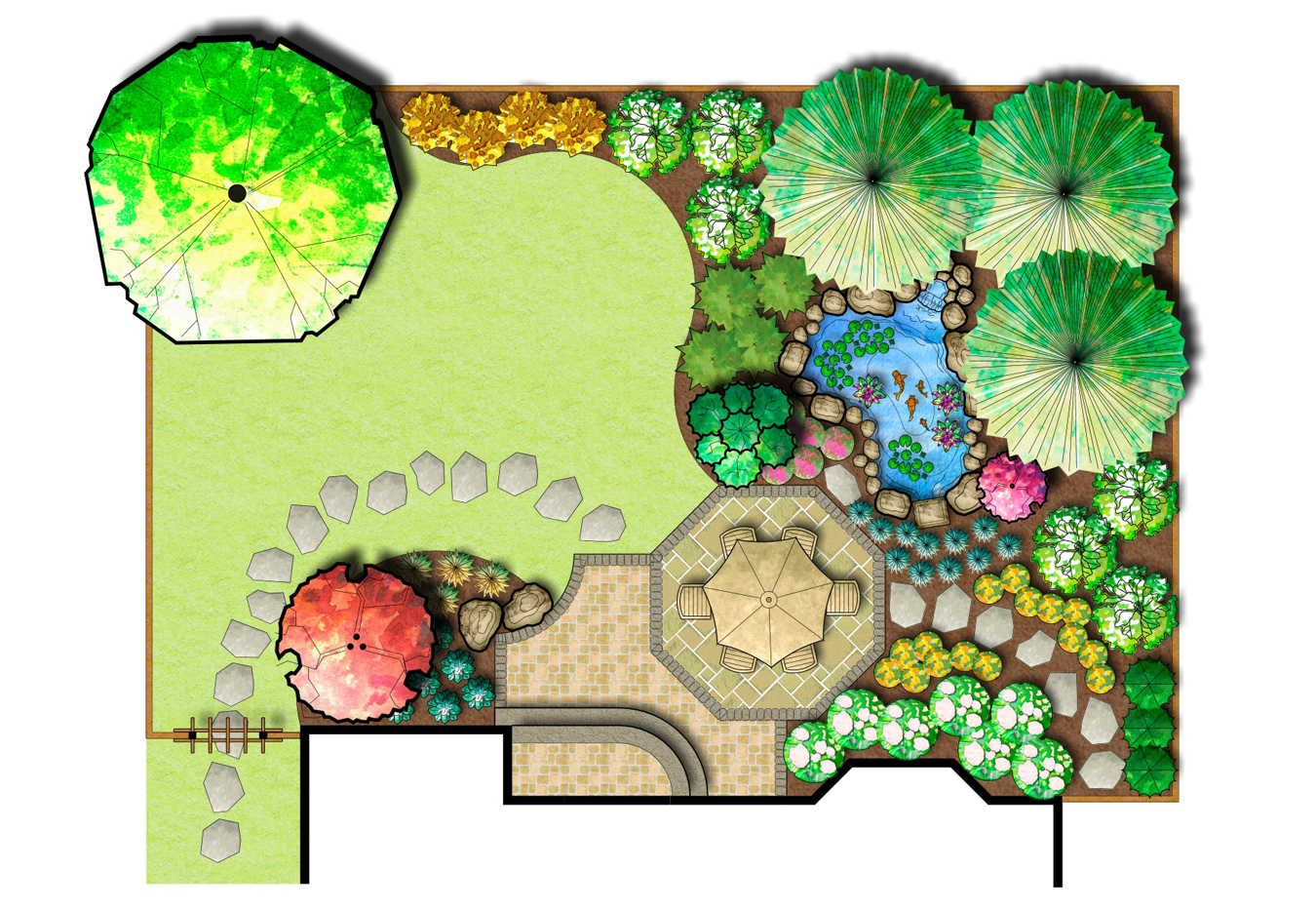
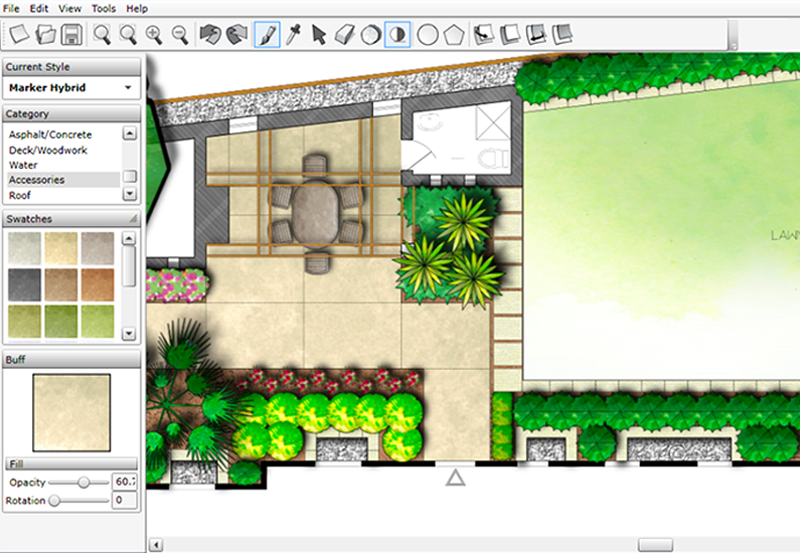


“Color to me is essential now.”
Color is an optional add-on to DynaScape Design and Creator.
Both products can help you create professional presentations. The difference comes down to how you prefer to design and what your projects require.
If your process starts with photos of an existing property, PRO Landscape+ offers tools built around that approach. If you regularly create detailed landscape plans that need to guide both client approval and installation, DynaScape Design may be a better fit.
Planting Plans, Material Quantities, and Takeoffs
Once you’ve laid out the design, you need to identify the plants and materials required to bring it to life. You also need accurate quantities to help your team plan the installation and prepare an estimate.
Both PRO Landscape+ and DynaScape Design offer tools to measure areas, count plants, and calculate material quantities.
PRO Landscape+ includes plant libraries, labeling tools, and material takeoffs. You can use these features to organize planting plans and calculate quantities for your estimates and proposals.
DynaScape Design also includes landscape-specific plant libraries, labeling tools, and automated takeoffs. You can count plant symbols, create plant schedules, and measure hardscape areas directly from your scaled drawing.
For example, say you’re designing a front yard renovation with a new walkway, foundation plantings, and fresh mulch beds. You’ll need to measure the walkway, count the plants, and calculate the area of each planting bed.
Both programs can help you pull those quantities from the design. The difference becomes more apparent when it’s time to use that information to price the work.
With PRO Landscape+, you can use those quantities to help prepare an estimate and proposal within the software. With DynaScape Design, you can organize them into a materials list and import that information into Manage360 for estimating.
For design-build firms, this can reduce the time spent entering quantities again when moving from design to estimating.
Moving From Design to Estimating and Proposals
After you’ve worked out the materials and quantities, you need to put a price on the project. That means accounting for materials, labor, equipment, overhead, and the other costs involved in completing the work.
Both PRO Landscape+ and DynaScape can help you move from design to estimating. But the tools and workflows differ.
PRO Landscape+: Design, Pricing, and Proposals
PRO Landscape+ includes pricing and proposal tools within its design software. You can use quantities from your plan to help price materials, prepare estimates, and create client proposals.
This can be useful for firms that want to handle design and sales in one program.
DynaScape Design + Manage360: Estimating Through Job Management
DynaScape Design connects with Manage360, DynaScape’s separate landscape business management system. You can export a materials list from your design and import it into Manage360.
From there, you can:
- Build detailed estimates using company-specific material costs, labor rates, equipment costs, overhead, and pricing.
- Create client proposals based on the estimated costs and scope of the project.
- Manage the approved work through scheduling, job tracking, and comparing actual costs against the estimate.
For example, a new walkway requires more than calculating the square footage of pavers. You also need to account for base materials, installation labor, equipment, and other costs.
With Design and Manage360, the quantities from your plan can serve as the starting point for that estimate. This helps reduce manual entry and keeps the proposal tied to the work you’ve planned. Estimators still need to review quantities, and design changes may require updates.
The handoff, visualized
Plant counts
Planting bed areas
PRO Landscape+ also integrates with Jobber, allowing approved quotes to move into business operations. This gives firms another way to connect sales with the work that follows.
Which Approach Fits Your Business?
If you want design, pricing, and proposals within one program, PRO Landscape+ may be a good fit.
If you need detailed cost-based estimating that carries into job management and cost tracking, DynaScape Design with Manage360 may be worth the additional investment.
See a DynaScape plan become a Manage360 estimate.
Ease of Use, Software Requirements, and Workflow Fit
Even the right features won’t help much if a landscape design software doesn’t fit how your team works. Think about the tools your designers already know, the computers they use, and how much training they’ll need.
PRO Landscape+ offers photo-based design tools alongside its CAD features. This gives designers different ways to approach a project, depending on their experience and how they prefer to present their ideas.
DynaScape Design uses a professional CAD environment with built-in landscape symbols, plant libraries, and drafting tools. These can help with common landscape design tasks, but there’s still a learning curve.
Neither option is automatically easier to use. If your team already has experience with one program, they may need less training to get started.
Your hardware and existing workflows also matter:
- PRO Landscape+: Runs on Windows and offers a tablet companion for working with designs away from your desk.
- DynaScape Design: Runs on Windows desktop computers.
- DynaScape Creator: Runs in a browser on Mac and PC. It’s a separate design product with different capabilities and doesn’t connect to Manage360 estimating.
Before switching software, consider how your existing drawings, team skills, and file-sharing needs will fit into the new setup. You’ll also want to account for the time it takes to learn the software and adjust your current process.
PRO Landscape+ vs. DynaScape Pricing: What Should You Consider?
When comparing prices, it’s important to look at what each subscription includes. PRO Landscape+ combines design, visualization, and proposal tools, while DynaScape offers separate products for different parts of the design-build process.
That means the total cost depends on which tools your business needs.
Here’s how the main subscription options compare:
| Software | Monthly price (USD) | Annual price (USD) |
|---|---|---|
| PRO Landscape+ | $90 | $900 |
| DynaScape Creator | $119 | No annual plan listed |
| DynaScape Design | $158 | $1,599 |
| DynaScape Design + Color + Sketch3D | $219 | $2,199 |
*Pricing last updated November 2026. Figures are separate monthly and annual billing options in USD, before taxes.
These prices cover different sets of features. PRO Landscape+ includes several design and presentation tools in its subscription. DynaScape Design includes professional drafting and takeoffs, while Color and Sketch3D are available separately or in bundles.
Manage360 is a separate product that adds cost-based estimating, proposals, and job management to the DynaScape Design workflow.
When comparing the total cost, consider:
- Additional software: Will you need rendering tools, estimating software, or business management features?
- Training and setup: How much time will your team need to learn the software?
- Existing tools: Can you keep using programs that already work well for your business?
The lowest subscription price won’t always mean the best value. Think about which tools your team will actually use and how well they support your work, from design through installation.
For the latest pricing and package information, visit PRO Landscape+’s subscription page and the DynaScape pricing page.
Compare plans, then see DynaScape Design in action.
Which Software Is Right for Your Landscape Business?
Here’s when each option may make the most sense for your landscape business.
Choose PRO Landscape+ If…
- You regularly use photo imaging, 3D visuals, or lighting effects to present designs to clients.
- You prefer to create designs, price projects, and prepare proposals within one program.
- Your current estimating and business management tools already work well for your team.
Choose DynaScape Design If…
- You regularly create detailed, scaled landscape plans that guide estimating and installation.
- You need professional drafting tools, plant labeling, and material takeoffs to define project scope.
- You want to carry design quantities into Manage360 for cost-based estimating, proposals, and job management.
If browser access is a priority, DynaScape Creator is also worth considering. It runs on Mac and PC and offers a browser-based approach to creating professional landscape designs. However, it doesn’t connect to Manage360.
Make Your Decision Based on How You Design and Build
PRO Landscape+ and DynaScape both offer professional landscape design tools. The right choice comes down to how those tools fit into the way you sell, estimate, and complete projects.
As you compare your options, think about what happens after a client approves a design. How does your team turn that plan into an estimate? What information needs to carry into scheduling and installation?
The answers can help you decide whether you need built-in design and proposal tools or a connected workflow that carries design details into estimating and job management.
If you’re looking for the latter, book a DynaScape Design demo to explore its professional drafting tools and see how design quantities can move into Manage360 estimating.
Book a DynaScape Design demo
See drafting, takeoffs, and the handoff to Manage360 estimating.
Not ready? Compare DynaScape pricing
Ready now? Buy in the DynaScape store
How we compared
A vendor wrote this. Here’s how we kept it fair.
- Who wrote it: the DynaScape team. We make DynaScape Design, Creator, and Manage360.
- PRO Landscape+ details: features, platforms, and pricing come from its public website and subscription page, checked November 2026.
- DynaScape details: pricing comes from our pricing page and online store, checked November 2026.
- What this is: a feature and workflow comparison, not a hands-on performance test. We don’t rank either product on ease of use.
- Lower subscription price: $90 per month vs. $158 for DynaScape Design
- Photo imaging on pictures of the client’s property
- Design, pricing, and proposals in one program
- A tablet companion for work away from the desk
- CAD precision with the look of a hand-drawn plan
- Design quantities import into Manage360 for cost-based estimating
- Estimates carry into scheduling, job tracking, and job costing
- A browser-based option, Creator, for Mac and PC
See something out of date? Tell us and we’ll fix it.
Frequently Asked Questions
Is PRO Landscape the same as PRO Landscape+?
PRO Landscape+ is the newer, subscription-based version of PRO Landscape. It includes landscape design, photo imaging, CAD, 3D visualization, and proposal tools.
If you’re familiar with the older PRO Landscape software, check the current PRO Landscape+ features and subscription options to see what’s changed.
Does DynaScape work on a Mac?
DynaScape Design is Windows-based and doesn’t run natively on a Mac. However, DynaScape Creator works in a web browser on both Mac and PC.
Creator is a separate product with different design capabilities, so the best option depends on the tools your projects require.
Can I move my PRO Landscape designs into DynaScape?
Both PRO Landscape+ and DynaScape Design support DWG files, which may allow you to transfer drawings between programs. However, some design elements may need adjustments after importing.
Before switching, check which file formats and design details will transfer, especially if you have a large library of existing projects.
Does DynaScape include estimating?
DynaScape Design includes plant counts and material takeoffs that help you calculate project quantities.
For cost-based estimating and proposals, you can connect Design with Manage360, DynaScape’s separate business management software. Manage360 uses those quantities alongside your company’s material, labor, equipment, and overhead costs to build estimates.
Which costs less, PRO Landscape+ or DynaScape Design?
Based on the prices listed above, PRO Landscape+ has the lower subscription price at $90 per month or $900 per year. DynaScape Design is $158 per month or $1,599 per year.
The two subscriptions include different tools, so compare what each one covers before deciding on price alone.