
Most landscape firms don’t lose time because their designers are slow. They lose time because the same tasks get repeated.
Maybe a site visit missed a key measurement, so someone has to go back. The design is recreated because it lives in one program while the estimate lives in another.
A client asks for another revision because they couldn’t clearly picture the first design. Then someone manually counts every plant and hardscape material to build the estimate, even though that information already exists in the design.
Sound familiar?
A more efficient landscape design process doesn’t mean rushing your work or skipping important steps. It’s about eliminating unnecessary tasks, so your team spends more time designing and less time repeating work that’s already been done.
In this article, we’ll walk you through where workflow bottlenecks occur, why they happen, and how to eliminate them so you can create faster proposals, smoother projects, and healthier profit margins.
Let’s get started.

Where Landscape Design Projects Actually Lose Time
Most landscape design workflows slow down because the same tasks happen more than once.
Maybe you measure a property, only to return later because an important detail was missed. Or you finish a design, then manually recreate the same information in an estimate because your systems aren’t connected.
An extra hour here or there may not seem like much. Over the course of a season, though, those repeated tasks add up to lost time, delayed proposals, and lower profitability.
Research from the construction industry shows that avoidable project mistakes and repeated work make up about 1-20% of a project’s total costs. The same principle applies to landscape design-build businesses, where every extra site visit, revision, or manual task takes time away from the next project—and increases the cost of the current one.
Fortunately, these delays tend to happen in the same places. Once you identify those workflow bottlenecks, they’re often easier to eliminate than you might expect.
| Where time gets lost | What helps |
| Returning to a site because measurements or notes were incomplete | Start with accurate survey data or a detailed base plan |
| Redrawing the same plant groupings or hardscape elements for every project | Save reusable templates and grouped design elements |
| Multiple rounds of revisions because clients struggle to visualize the design | Use clearer visual presentations to build confidence earlier |
| Manually reentering design details into an estimate | Connect design and estimating so quantities carry over automatically |
Let’s take a look at each of these opportunities in more detail.
RELATED ARTICLE: Be the First Proposal and Win More Jobs
Get Site Information Right the First Time
Many workflow bottlenecks start with incomplete or inaccurate site information.
A grade change that wasn’t recorded. A tree or utility line that gets missed. Whatever the reason, someone now has to update the design. Or worse, they have to return to the property to collect information that should have been captured during the first visit.
This is where landscape design efficiency begins.
If you’re working from a survey, build your design on accurate site data instead of estimating dimensions from photos or field notes. If a survey isn’t available, create a detailed base plan that captures everything you’ll need later, including:
- Exact dimensions
- Existing structures
- Grade changes
- Drainage patterns
Getting this information right the first time makes every stage that follows easier.
Design work moves faster because everyone is working from accurate site data. Estimates are more reliable because they’re based on complete information. And your team spends more time designing instead of returning to the site to capture details that should have been recorded during the first visit.
RELATED ARTICLE: How to Take Accurate Landscape Site Measurements
Stop Rebuilding Common Design Elements from Scratch
How many times have you drawn the same patio layout? Or recreated the same foundation planting or privacy hedge?
If you’re starting from scratch every time, you’re paying for it in hours.
Instead, save the design elements you use most often and reuse them across projects. Common examples include:
- Patio furniture layouts
- Foundation planting combinations
- Privacy hedge groupings
- Paver patterns
- Water features
- Landscape lighting layouts
Reusable design elements save time, and they also improve consistency. A standard planting layout or hardscape detail looks the same from one project to the next. That makes it easier for your team to design, estimate, and install with confidence.
A large library of landscape symbols and plant materials helps even more. Instead of recreating common elements, designers can quickly place professionally drawn plants, hardscape features, and site furnishings that are already scaled and ready to use.
The landscaping industry has largely embraced digital design tools. According to the 2025 Landscape Industry Trends Report, 93% of landscape businesses use software in their operations. And 73% say technology will play an increasingly important role in their future.
Reusable design assets are one of the ways those tools help teams work more efficiently without sacrificing quality.
Reduce Revision Cycles Before They Become Redesigns
A few design revisions are part of every project. The problems start when clients are still making major changes because expectations weren’t aligned from the beginning.
Maybe the patio needs to be larger. Then the plant palette changes. Then the budget forces a layout redesign. Each decision seems small on its own, but together they can add hours of additional design work and delay the proposal.
The goal isn’t to eliminate revisions, but to keep them focused and manageable.
A few simple practices can make a big difference:
- Set expectations early by discussing the client’s budget, priorities, and must-haves before design work begins.
- Use visuals that help clients understand the design and make decisions with confidence.
- Define how many rounds of revisions are included before additional fees apply.
- Document approvals so everyone has a clear record of what’s been decided.
A structured revision process keeps projects moving forward. Clients understand what’s expected, designers spend less time revisiting earlier decisions, and proposals reach the finish line sooner.
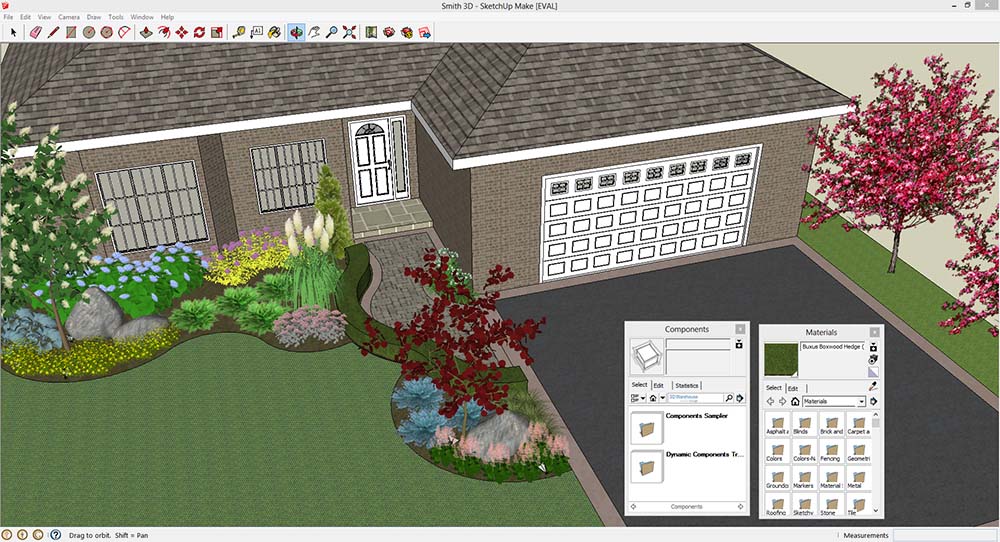
Make Client Decisions Easier with Better Visual Communication
Most clients aren’t landscape designers. They can’t look at a black-and-white plan and picture what their finished landscape will look like.
When clients aren’t sure what they’re seeing, they ask more questions. They request alternatives. They hesitate to approve the design because they’re still trying to imagine the finished result.
Clear visual communication helps remove that uncertainty.
| What the client sees | What they take away |
| A black-and-white landscape plan | “I’m not completely sure what this will look like.” |
| A color rendering with realistic materials | “I can picture the finished landscape.” |
| A 3D walkthrough | “I can see how this space will look and feel.” |
For example, color renderings help clients connect technical drawings to the finished project. They can better understand plant groupings, hardscape materials, and the overall layout without relying on their imagination.
For projects where visualization plays a bigger role, 3D presentations add another level of clarity. Clients can explore the space from different angles, understand how design elements fit together, and feel more confident about the final result before construction begins.
When clients understand the design, they make decisions faster. That means fewer unnecessary revisions, smoother approvals, and less time spent revisiting decisions later in the project.
RELATED ARTICLE: The Art of Landscaping: Why the Look of the Design Matters
Turn Finished Designs into Accurate Estimates Faster
The design is finished. The client approves it.
Now comes the part nobody looks forward to—counting every plant, measuring every square foot of patio, and typing it all into a spreadsheet by hand.
For many landscape firms, this is where the workflow slows down.
The design lives in one file while the estimate lives in another. The result is that someone has to move information from one place to the other. Every manual step like this takes time and creates another opportunity for mistakes.
Here are a few examples of common problems from manual processes:
- Counting plants and materials by hand can lead to missed or duplicate quantities.
- Pricing from a spreadsheet increases the risk of using outdated costs.
- Updating the estimate separately after every design change can leave the estimate and design out of sync.
- Retyping quantities into a proposal takes time that could be spent on the next project.
A connected workflow removes many of those manual steps. Quantities flow directly from the design into the estimate, so you’re working from the same information throughout the project. When the design changes, the estimate changes with it.
That’s how DynaScape connects design and estimating. Instead of recreating information, you can move from a finished design to an accurate estimate much faster.
Small Improvements Add Up Across the Entire Design Process
The most efficient landscape design processes remove unnecessary steps so your team can spend more time designing and less time managing avoidable tasks.
Returning to a site because measurements were incomplete. Redrawing the same design elements. Manually updating estimates every time a design changes. Every unnecessary task like these takes time away from your next project.
You don’t have to solve every problem at once, though. Start with the workflow bottleneck that’s costing your team the most time. Once you’ve improved that stage, move on to the next.
Purpose-built software like DynaScape supports that process by connecting design, estimating, and project handoffs. But the biggest gains come from building a workflow that eliminates unnecessary manual work in the first place.
Small improvements add up. Faster proposals. Smoother projects. More time to focus on designing landscapes instead of managing repetitive tasks.
RELATED ARTICLE: The Ultimate Guide to Pricing Landscaping Jobs